



1. Introduction
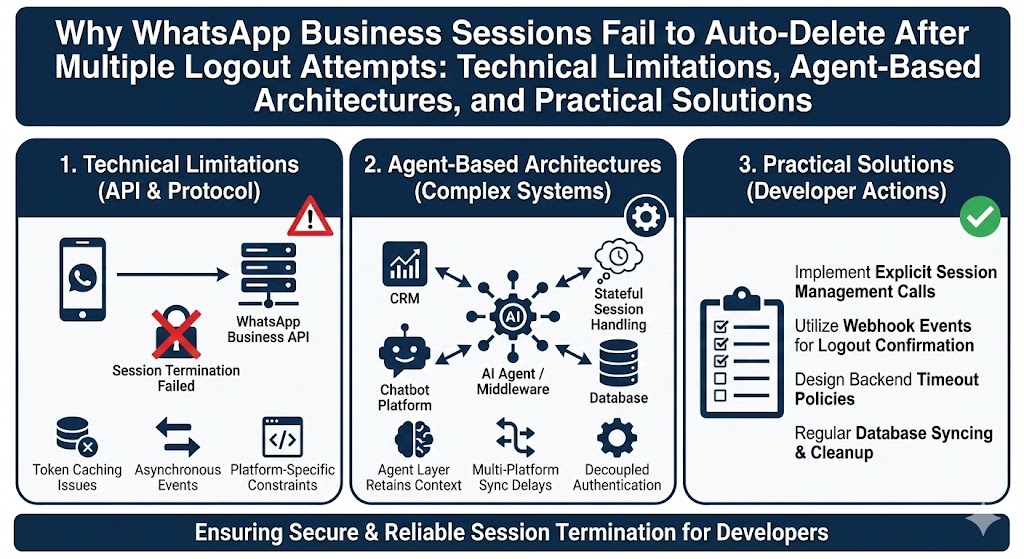
With the rise of AI chatbots, generative AI systems, and autonomous agents, WhatsApp has become a popular communication channel for real-time user interaction. Many developers design web applications that allow users to create, manage, and delete WhatsApp sessions remotely. Ideally, deleting a session from a web application should also remove the linked device from the user’s mobile phone.
However, developers often observe the following behavior:
- Initially, deleting a session from the web app removes the device from both normal WhatsApp and WhatsApp Business.
- After repeated attempts, WhatsApp Business stops auto-unlinking, while normal WhatsApp may still work intermittently.
This behavior leads to confusion and incorrect assumptions about bugs in code or libraries.
2. Understanding WhatsApp Multi-Device Architecture
2.1 Primary and Secondary Devices
WhatsApp operates on a primary–secondary device model:
- Primary device: The mobile phone (Android or iOS)
- Secondary devices: WhatsApp Web, desktop clients, and automation libraries (e.g., Baileys)
The mobile phone always has final authority over linked devices.
2.2 Role of Automation Libraries (e.g., Baileys)
Libraries such as Baileys act as unofficial WhatsApp Web clients. When a developer calls a logout function, the library:
- Sends a logout request to WhatsApp servers
- Closes the WebSocket connection
- Deletes local authentication data
However, the final decision to unlink the device is made by WhatsApp servers and the phone, not by the library.
3. Difference Between Normal WhatsApp and WhatsApp Business
| Aspect | Normal WhatsApp | WhatsApp Business |
|---|---|---|
| Device persistence | Moderate | Very high |
| Background restrictions | Lower | Aggressive |
| Logout handling | Often accepted | Often ignored |
| Business continuity | Not critical | Critical |
| Auto-unlink reliability | Medium | Low |
WhatsApp Business is designed for business continuity, meaning it avoids aggressive device removal to prevent accidental service disruptions.
4. Why Auto-Delete Works Initially but Fails Later
4.1 Server-Side Trust Degradation
When a device is repeatedly:
- Linked
- Logged out
- Re-linked
- Deleted
WhatsApp Business backend downgrades trust for automatic unlink requests. Logout commands are treated as non-critical signals.
4.2 Rate Limiting of Logout Requests
WhatsApp Business silently rate-limits repeated logout attempts. This is done to:
- Prevent abuse
- Prevent session hijacking
- Reduce automation misuse
No error is returned to the developer.
4.3 Background and Battery Optimization
After multiple reconnects:
- WhatsApp Business app often remains backgrounded
- Battery optimization suspends background sync
- Logout requests never reach the active app state
As a result, the unlink action is never processed.
4.4 Backend Policy Changes (2024–2025)
Recent backend updates by Meta have tightened control over:
- Linked devices
- Unofficial automation tools
- Repeated QR-based sessions
This has made auto-unlinking unreliable, especially for Business accounts.
5. Common Misconceptions Regarding WhatsApp Business Session Deletion
During the development of WhatsApp automation systems, several misconceptions frequently arise among students and developers. These misunderstandings often lead to incorrect debugging efforts, unnecessary code changes, and unrealistic expectations from automation libraries. This section clarifies the most common misconceptions and explains why they are technically incorrect.
Misconception 1: “This is a bug in the Baileys library”
❌ Incorrect
A widespread assumption is that the failure to automatically unlink a WhatsApp Business session is caused by a defect or incomplete implementation in the Baileys library. In reality, Baileys performs its responsibilities correctly and as intended.
From a technical standpoint, when a logout operation is triggered, Baileys successfully:
- Sends a logout request to WhatsApp servers
- Terminates the WebSocket connection
- Deletes local authentication and session data
However, Baileys has no authority over the mobile device or WhatsApp Business application. The final decision to unlink a device is made entirely by WhatsApp’s backend infrastructure and the mobile phone. If WhatsApp Business chooses not to process the logout request—due to background state, rate limiting, or internal policy—the device remains visible on the phone.
Therefore, the observed behavior is not a software bug in Baileys but a consequence of WhatsApp Business intentionally ignoring or deferring the logout request.
Misconception 2: “There must be an API to force unlink a WhatsApp Business device”
❌ Incorrect
Another common belief is that a hidden, undocumented, or premium API exists that can force WhatsApp Business to instantly unlink a device from the phone. This assumption is incorrect and unsupported by any official or credible technical evidence.
WhatsApp (Meta) does not provide:
- Any public API
- Any private developer endpoint
- Any enterprise-level override
that allows remote, forced removal of linked devices from the phone. Even WhatsApp’s official Cloud API does not expose functionality to revoke linked devices on behalf of the user.
This limitation is deliberate. WhatsApp Business prioritizes account security and business continuity, ensuring that only the account owner, through the mobile application, can make final decisions about linked devices. As a result, manual unlinking from the phone remains the only guaranteed method when automatic unlinking fails.
Misconception 3: “It worked before, so it should continue working now”
❌ Incorrect
Developers often assume that because automatic unlinking worked earlier in testing or production, it should continue to function reliably in the future. This assumption overlooks a critical reality: WhatsApp’s backend behavior is not static.
WhatsApp regularly updates its server-side logic to:
- Prevent automation abuse
- Improve account security
- Enforce new policies for business accounts
As a result:
- Logout requests that were previously honored may later be ignored
- Repeated login–logout cycles can reduce backend trust
- Behavior can change without any public announcement
Because these decisions are made entirely on WhatsApp’s servers, developers have no visibility into when or why such changes occur. Consequently, relying on past behavior as a guarantee for future functionality is technically unsound.
Summary of Misconceptions
In summary, the failure of WhatsApp Business sessions to auto-delete after multiple attempts:
- Is not caused by faulty code
- Is not solvable through an API or workaround
- Is not guaranteed to behave consistently over time
Understanding these misconceptions allows developers to design systems that are robust, secure, and aligned with the real constraints of WhatsApp’s infrastructure rather than relying on assumptions that cannot be technically enforced.
6. Verified Evidence and References
- WhatsApp Official FAQ states that linked devices remain active until manually removed or after long inactivity (approximately 30 days).
- Developer community reports (GitHub, Reddit) consistently confirm that logout requests are best-effort and not guaranteed.
- Baileys documentation and issues confirm that logout cannot force device unlinking.
These sources collectively prove that multiple logout attempts do not guarantee device removal, especially for WhatsApp Business.
7. The Only Correct Production-Grade Solution
Since forced unlinking is impossible, developers must implement a logical session-revocation architecture.
7.1 Layer 1: Logical Session Deletion
When a user deletes a session from the web app:
- Send logout request
- Delete authentication files
- Remove database records
- Mark session as revoked
This ensures the session is functionally dead, even if the phone UI still shows it.
7.2 Layer 2: Reconnection Blocking
Any attempt by WhatsApp to reconnect the old session must be rejected. This prevents ghost or zombie sessions.
7.3 Layer 3: Forced Re-Authentication
If the user wants to reconnect:
- Old credentials must never be reused
- A fresh QR scan is required
7.4 Layer 4: Clear User Communication
Users must be informed clearly:
“For WhatsApp Business users, device removal may require manual unlinking from the phone due to WhatsApp restrictions.”
This is standard practice in professional SaaS platforms.
8. Implications for AI Agents and Automation Systems
In AI-driven systems (chatbots, agents, workflow automation):
- LLMs handle language and reasoning
- Agents manage decisions, tools, and state
- WhatsApp sessions must be treated as revocable resources, not guaranteed remote-kill connections
A well-designed agent system never assumes physical device unlinking will succeed.
9. Conclusion
The inability to auto-delete WhatsApp Business sessions after multiple attempts is not a coding error, library limitation, or developer oversight. It is a deliberate consequence of WhatsApp Business backend design, trust degradation, and recent policy changes. While automatic unlinking may work initially, it cannot be relied upon in production systems.
The only reliable approach is logical session revocation combined with user guidance for manual unlinking. Developers who adopt this model build systems that are secure, scalable, and resilient to future WhatsApp backend changes.